pypi
安装
Python 2.7.9 + 或 Python 3.4+ 以上版本都自带 pip 工具(pypi客户端交互命令),也可以通过系统包管理工具安装如ubuntu
sudo apt-get install python-pip
国内pypi镜像源
- 镜像源列表:
配置从镜像源安装包,pip文件路径:
linux(macos)系统下pip配置文件路径: ~/.pip/pip.conf
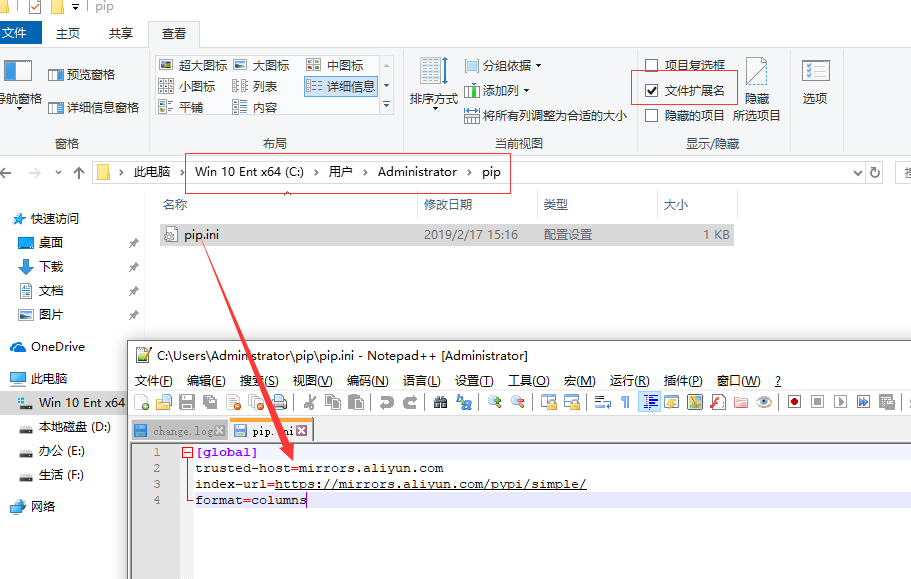
windwos系统下(xx为电脑用户名): C:\Users\xx\pip\pip.conf
配置内容:
[global]
trusted-host=mirrors.aliyun.com
index-url=https://mirrors.aliyun.com/pypi/simple/
format=columns
window配置如下图所示
安装三方包
安装一个包
pip install "SomeProject"
pip install "SomeProject==1.4"
pip install "SomeProject>=1,<2"
pip install "SomeProject~=1.4.2"
安装一系列的包
pip install -r requirements.txt从其他非pypi官网源安装包
pip install --index-url=https://mirrors.aliyun.com/pypi/simple/ SomeProject从vcs上面安装,如github上面安装sanic
pip install -e git+https://github.com/huge-success/sanic.git#egg=sanic从本地某个路径安装
pip install -e <path>从源码包安装
pip install ./downloads/SomeProject-1.0.4.tar.gz
升级包
更新包
pip install --upgrade SomeProject
卸载
pip uninstall SomeProject
搜索
pip search SomeProject
显示安装包信息
简略
pip show SomeProject详细
pip show -f SomeProject
显示安装列表
已经安装的包列表
pip list可以升级的包列表
pip list -o过期包列表
pip list --outdated
导出项目依赖包到requirements.txt中
pip freeze > requirements.txt
pip命令自动补齐
bash
pip completion --bash >> ~/.profilezsh
pip completion --zsh >> ~/.zprofile